IBM CMOD Migration Guide: How to Migrate Without Risk
IBM Content Manager OnDemand (CMOD) has powered enterprise document archives for decades. But escalating licensing costs, aging infrastructure, and the absence of modern API support are forcing organisations to act. Migrating from IBM CMOD is complex — but with the right approach, it can be done without downtime, data loss, or the AFP conversion nightmare most vendors force on you. This guide explains how.
In this guide
Why Companies Leave IBM CMOD
The decision to migrate from IBM CMOD rarely comes from a single event. It builds over years of compounding pressure:
- High annual licensing costs with no corresponding product innovation
- Outdated technology stack that cannot connect to modern cloud-native applications
- Hard integrations — no native REST API, brittle adapters required for every system
- Limited flexibility — object group structures are rigid and difficult to evolve
- End-of-support timelines forcing costly version upgrades with no strategic benefit
- Growing demand for AI and LLM access to archive content that CMOD cannot support
- Compliance demands — GDPR redaction, audit trails, retention automation — that CMOD was never designed to meet natively
Migration Challenges
Most IBM CMOD migration projects fail not because of the technology — but because of planning gaps and vendor-imposed constraints. The four most common failure modes:
- AFP bulk conversion upfront: Vendors that require converting all AFP to PDF before ingestion expose you to months of processing time, significant format fidelity loss, and massive cost — before a single document is migrated
- Big bang cutover: Migrating all data before the new system is validated creates unrecoverable failure scenarios and guarantees downtime
- Huge data volumes: Enterprises running CMOD often hold billions of documents — migrating at scale requires a tool built for high-volume batch processing, not a general-purpose archive
- Compliance requirements: Retention policies, audit logs, and access controls must be replicated exactly — not approximated — or the migration creates a regulatory liability
Why AFP Is the Hardest Part
AFP (Advanced Function Presentation) is IBM's proprietary mainframe print stream format. Banks, insurers, and telecoms have accumulated millions — sometimes billions — of AFP documents over 20+ years of CMOD operation.
AFP is IBM-specific. It is not a universal format. It encodes complex layout instructions, overlays, page segments, and form definitions that do not map cleanly to PDF or any other container format.
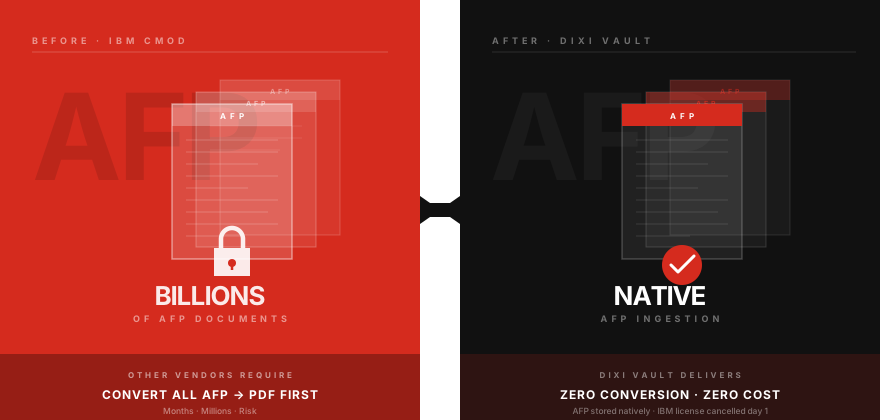
Most archive platforms treat AFP as a problem to solve through conversion: extract content to PDF or TIFF before ingestion. This approach is expensive, slow, and lossy. Complex AFP resources do not survive conversion with pixel-level fidelity, and the original document is destroyed in the process.
A genuine CMOD alternative must ingest AFP natively, store it as AFP, and render it on demand — without conversion. This is technically difficult, which is why most platforms avoid it entirely. It is also the only approach that actually works at enterprise scale.
How DIXI Vault Solves This
DIXI Vault was built from the ground up for organisations running IBM CMOD with large AFP estates. Key architectural decisions that eliminate the common migration failure modes:
- Native AFP ingestion — no conversion required, documents stored exactly as received from mainframe
- AFP-to-PDF rendering on demand, with full fidelity for overlays and page resources
- CMOD object group import — existing index structures mapped automatically during migration
- Phased migration — CMOD and DIXI Vault run in parallel during cutover, eliminating downtime risk
- 98% PDF compression for newly ingested documents — drastically reduces storage cost post-migration
- Built-in GDPR redaction, retention policy engine, and full audit trail from day one
- MCP server for LLM integration — archive content becomes queryable via natural language after migration
Migration Process
A successful IBM CMOD migration follows four phases. The goal is no downtime, no data loss, and no forced cutover moment.
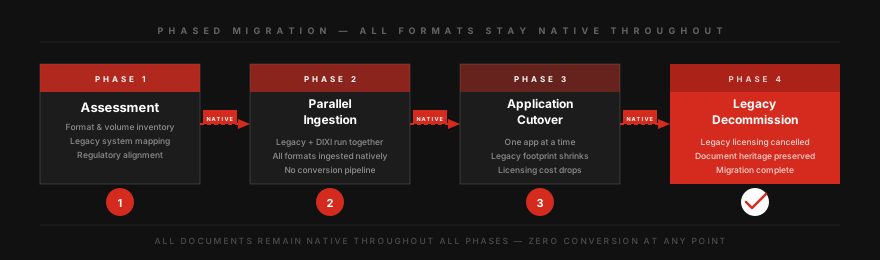
Inventory AFP volumes by object group, document age, and access frequency. Identify regulatory retention requirements. Map CMOD index schema to DIXI Vault schema. Estimate compression savings and storage delta. Output: a clear migration scope and effort estimate.
DIXI Vault begins ingesting new documents from live production channels. CMOD continues operating. Both systems run simultaneously. New AFP output is validated against DIXI Vault rendering in parallel. Teams access documents through DIXI Vault while CMOD remains the system of record for historical data.
Historical CMOD archives are migrated object group by object group, validated in batches. No bulk conversion — AFP documents are transferred as-is and indexed in DIXI Vault. Consuming applications are switched to DIXI Vault one at a time as their data becomes available. Users notice no disruption.
Once all historical data is validated and 100% of production ingest flows through DIXI Vault, CMOD is decommissioned. Licences are terminated. The migration is complete — with zero downtime, zero data loss, and a full audit trail covering every document migrated.
This phased approach means zero downtime, zero data loss, and no business disruption. Users never experience a hard cutover — DIXI Vault simply replaces CMOD over a controlled window.
For a deeper look at the platform, visit migration overview, platform features, or why DIXI Vault.
Start Your CMOD Migration Assessment
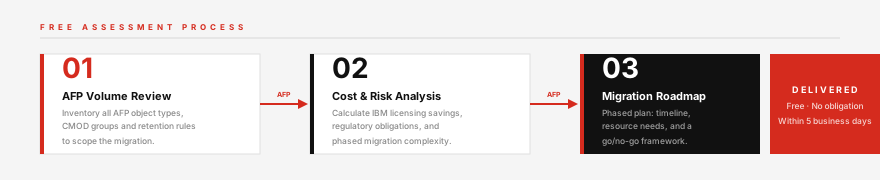
Get a structured, no-obligation assessment covering your AFP volumes, migration scope, and a clear roadmap from CMOD to DIXI Vault.
Start your CMOD migration assessment →